 OfficeSwap
Office Analytics for Admins: See How Your Offices Are Really Used
Ask most offices how well their space is used and you'll get a guess. Badge swipes tell you who came in, not which offices sat dark while someone hunted for a room. Because OfficeSwap already knows who's away, who asked for an office and who got one, it can tell you exactly how your offices are used, day by day.
Insights, for admins
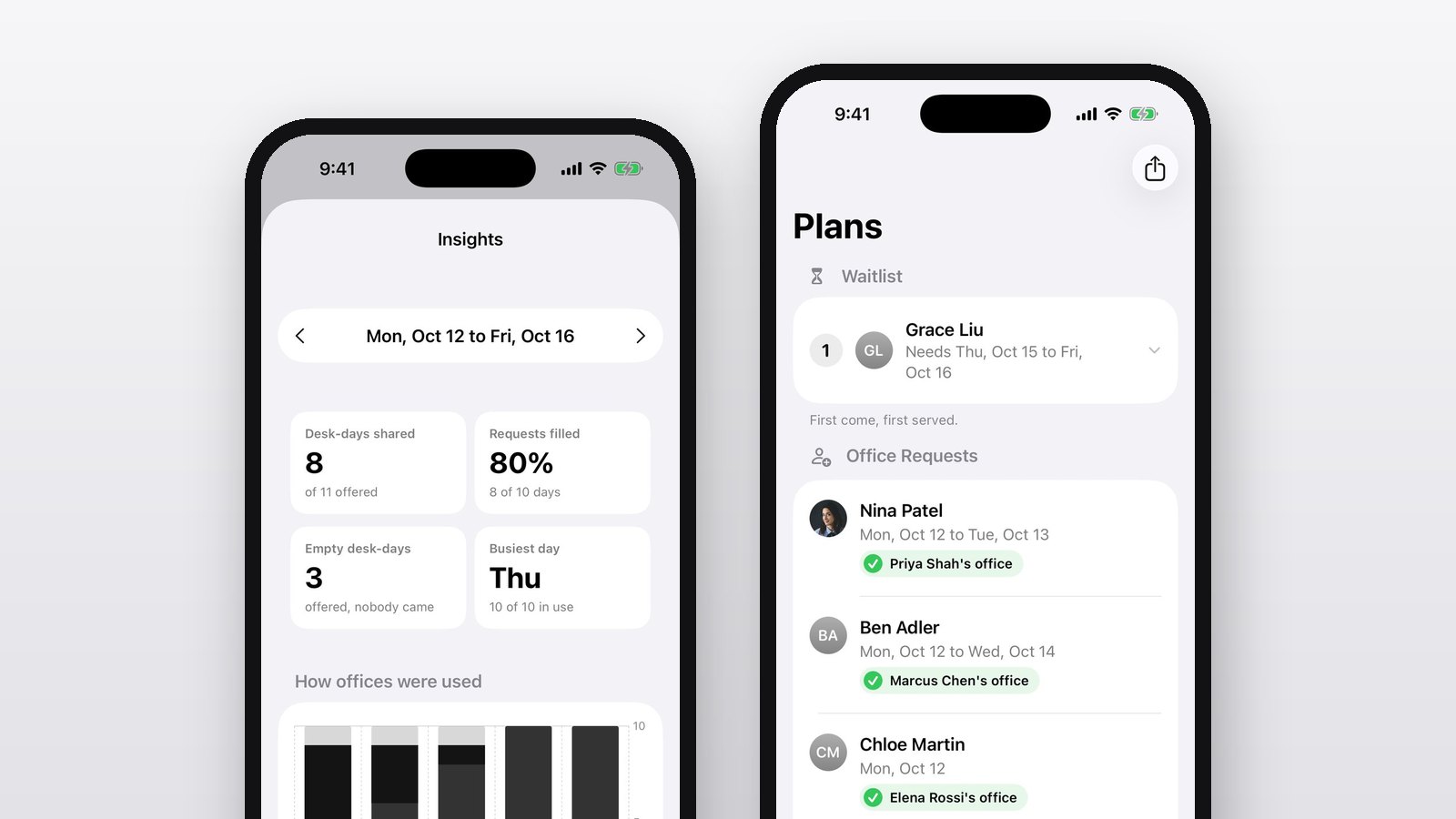
Admins open Settings, then Insights, to see any week at a glance:
- Desk-days shared: how many offered office-days went to someone else, out of how many were offered.
- Requests filled: the share of requested days that got an office. If this is low, you need more offers, or more offices.
- Empty desk-days: offices that were offered but nobody used. That's space you're paying for that did nothing.
- Busiest day: the day with the most offices in use, so you know when the building is full.
- How offices were used: a chart for each weekday, split into office holders in, visitors, and empty.
Flip back through past weeks to see trends. Is Friday always empty? Is Tuesday always full? Now you know.
Stats for every person
Every profile also shows that person's running totals: days in the office, requests made and days requested, offers made and days offered, how many days others used their office, and messages sent. They're kept for as long as your organization uses OfficeSwap, so they don't disappear when old weeks roll off the schedule.
They're handy for spotting the generous office holders who make sharing work, and the people who never get an office because they ask too late.
Turning numbers into decisions
- Lots of empty desk-days? Remind people to request offices: there's space going unused.
- Requests filled is low? Ask office holders to offer their offices on the days they're out, or turn a spare room into a guest desk.
- One day is always full? Spread team days across the week.
- Need the raw data? Export the whole schedule as a CSV file from Plans for Excel, Numbers or Google Sheets.
Private by design
Insights only counts what's already in your schedule, and only your organization can see it. Nothing is shared with other companies, sold or used for advertising. Read more in our Privacy Policy.